
PRODUCT & EXPERIENCE DESIGN · PARSONS CAPSTONE
Saathi: Designing for Tech Anxiety in Indian Households for Older Adults
Saathi (meaning companion or partner in Hindi)
A mobile learning platform helping senior citizens in India build digital independence through self-paced practice, familiar language, and family caregiver support.
ROLE
Lead Product Designer & UX Researcher
AUDIENCE & REACH
Seniors (65+) · 7 User Sessions · Family Caregivers
TIMELINE
2023 – 2024 · Parsons School of Design Capstone
METHODS & TOOLS
Figma · Affinity Mapping · Usability Testing · Zoom
THE PROBLEM & CONTEXT
Access is not the barrier. Fear of making mistakes is.
While smartphone penetration among urban Indian households is growing, seniors face deep emotional and cognitive hurdles...
01 / EMOTIONAL FRICTION
Fear of Irreversible Errors
Seniors hesitate to tap because they fear accidental charges or deleting files.
02 / CULTURAL FRICTION
Unfamiliar Technical Lexicon
Generic English system jargon creates a cognitive barrier for non-native digital users.
03 / COGNITIVE FRICTION
Memory & Retention Limits
Verbal instructions from family are quickly forgotten, making repetitive relearning essential.
Sandbox Practice with Zero Real-World Risk
Seniors hesitated to tap live interfaces out of fear that a wrong tap would send money or delete personal files. Saathi introduces an isolated simulation sandbox where actions are non-destructive, accompanied by clear "Undo" and safe recovery paths on every screen.
Single-Action Steps & Replayable Micro-Guides
Verbal demonstrations from family members were forgotten quickly. Tasks such as booking transportation or placing a video call are broken into single-step checkpoints with short looping visual walkthroughs that users can replay at their own pace without judgment.
Asynchronous Family Guidance Notes
Repeated verbal explanations strained relationships between seniors and busy family members. Saathi enables family members to record 30-second audio or text tips attached to specific tasks, preserving emotional support while fostering independent mastery.
Goal-Oriented Everyday Language
System jargon like "Authenticate," "Sync," or "Cloud" created mental barriers. The interface replaces technical jargon with conversational, daily task descriptions such as "Send a photo to family" or "Pay the monthly electric bill."
Challenge

digital divide, lacking digital literacy
social isolation
limited exposure to technology
apprehension about new digital interfaces.
Senior citizens in India face a significant
Bridging the Digital Divide for Senior Citizens
Solution
A thoughtfully designed digital platform that empowers senior citizens by addressing the unique challenges they face in adapting to technology.
user-friendly tutorials
guided assistance
intuitive interfaces

Success Metrics 🫡
The iterative design process improved tool usability. Testing feedback highlighted areas for improvement, benefiting users. Onboarding success rate: 80%.
Seniors gained confidence in using the digital tool independently, showing its intuitive design.
Saathi built a strong community, improving engagement and satisfaction. Ease of navigation: 70% of users found it successful; 20% faced usability issues initially.
The video library offered valuable resources, educating users on tool navigation while providing support and belonging.
Combining remote and in-person testing deepened understanding of user experiences, facilitating targeted enhancements for seniors’ needs.
Shout out for Saathi 🥳


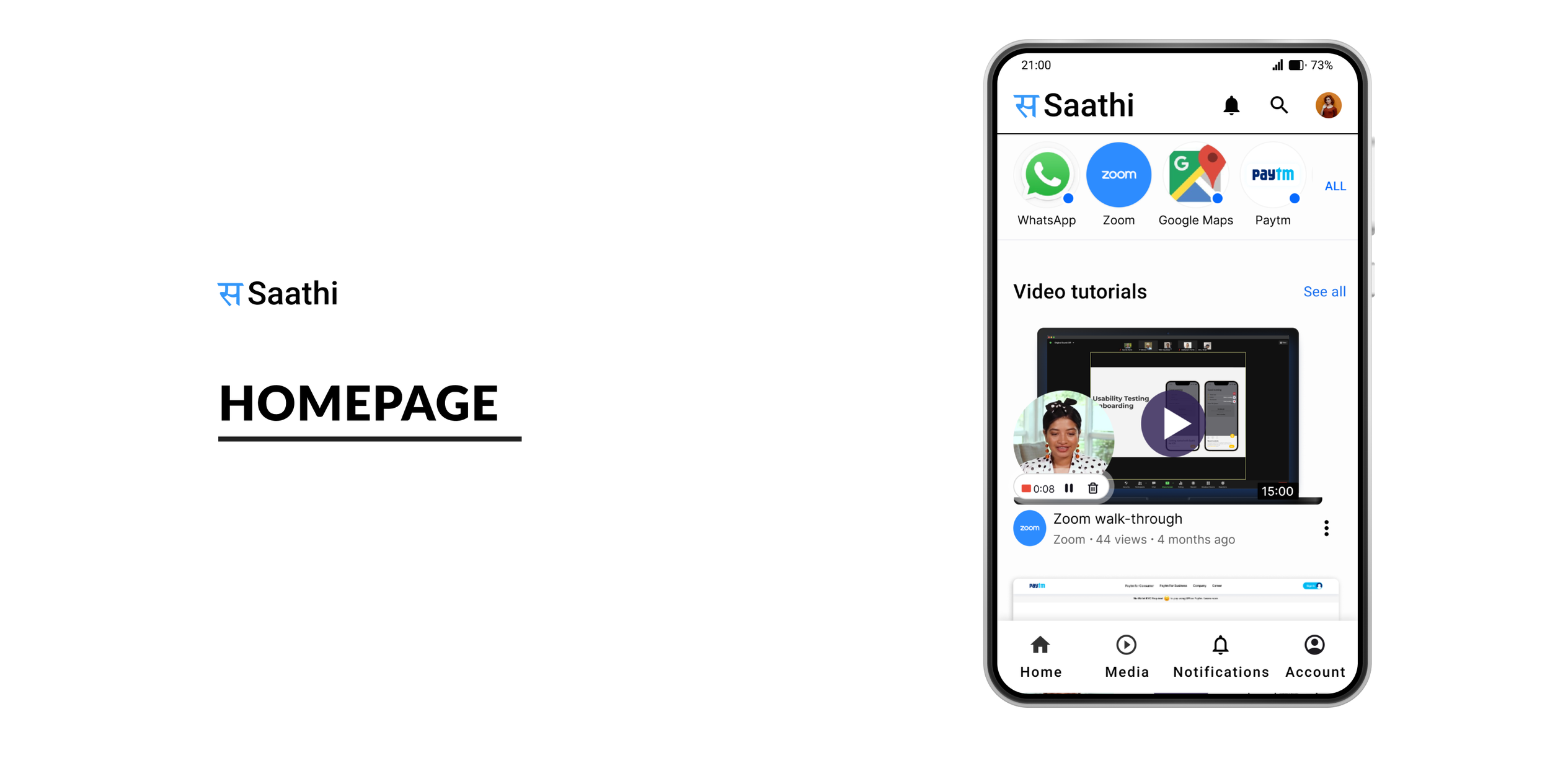
Final App designs




Stakeholder feedback
Encouragement for Iteration:
Feedback highlighted the need for ongoing testing and iteration to refine the platform's usability, particularly in making the interface more intuitive for older adults.
Positive Reception of Concept: Stakeholders appreciated the focus on bridging the digital divide for senior citizens, recognizing the potential societal impact of enhancing digital literacy and reducing social isolation.
Research question
What can family caregivers do to help seniors with technology?
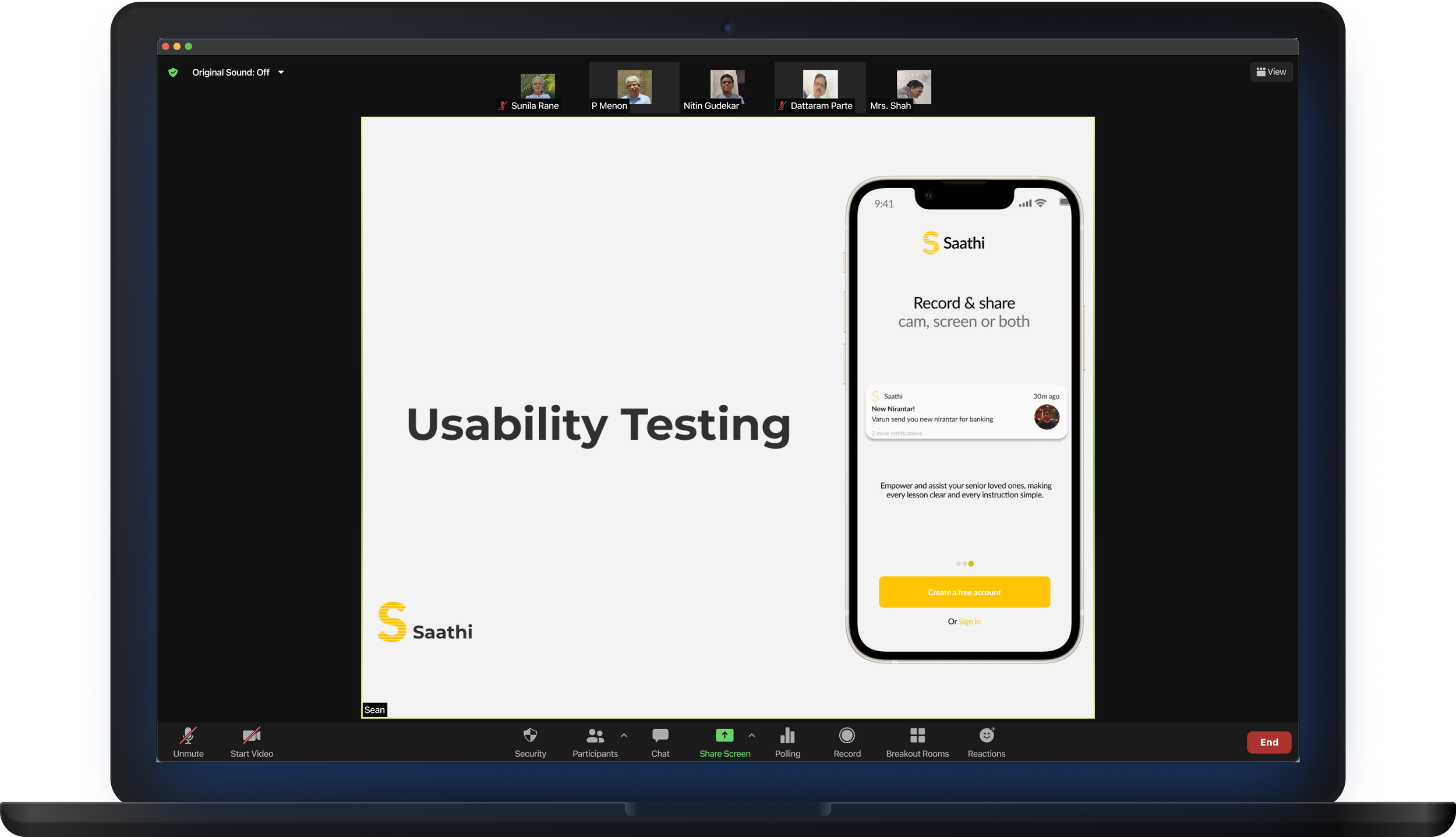
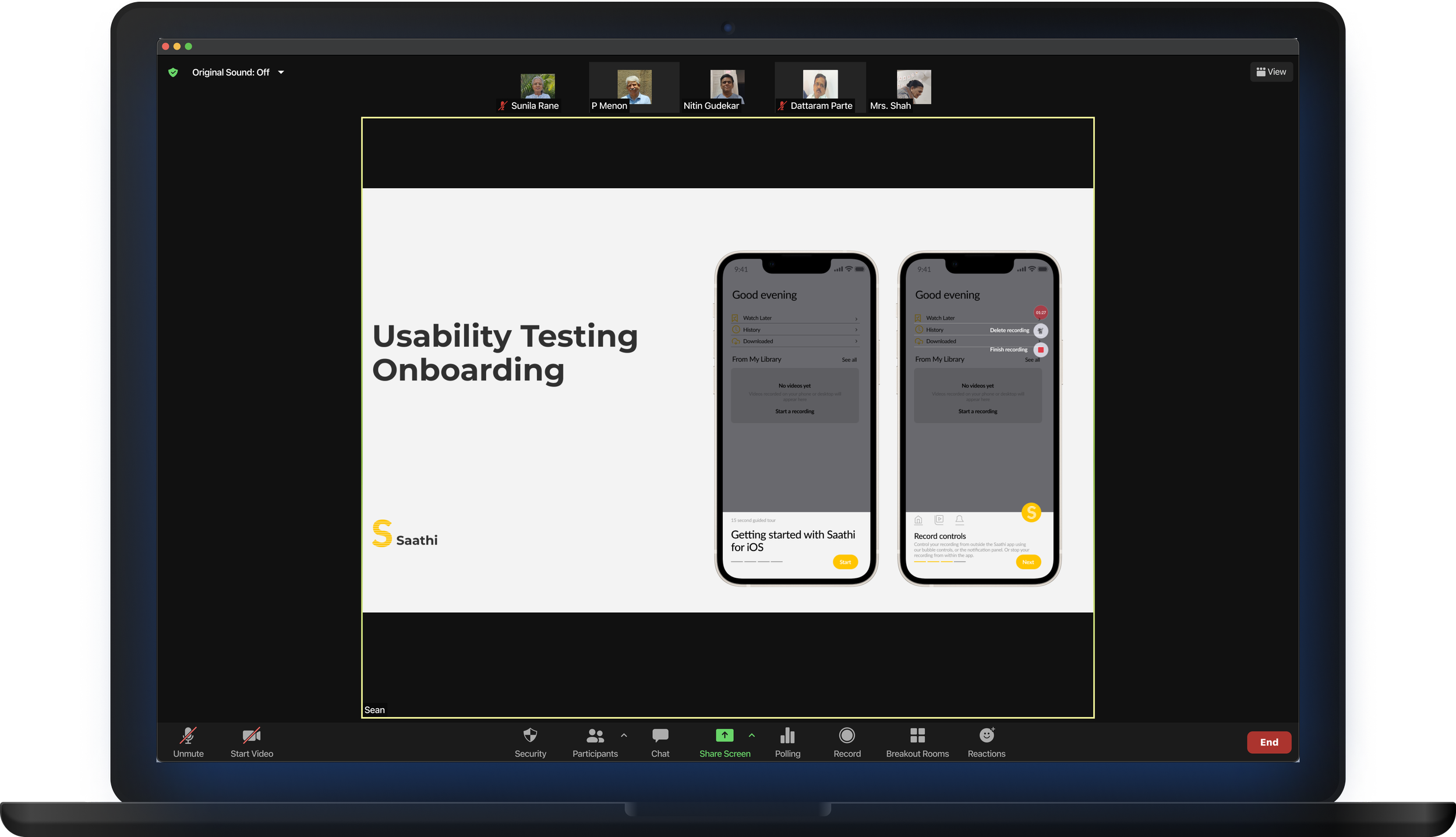
Remote testing with Seniors
Tools used : Figma, Zoom, Otter
Research Methods: Affinity Mapping, Usability Testing, Prototype Testing
Participants : 7 senior adults (aged 65+)
Saathi USP
Empowering seniors
From tech-reliant to tech-literate via familiar language and a safe space.
User Needs Identified
Primary user : Senior citizens
Need for personalized learning at one’s own pace.
Tailored content in a familiar language
Not designed for Indian seniors; lacking cultural relevance and understanding.
Lack of cultural relevance
Seniors need to rewatch and relearn digital tasks as they forget the steps.
Cognitive learning
User Testing with caregivers


Common questions
seniors ask caregivers

Feedback
from Caregivers

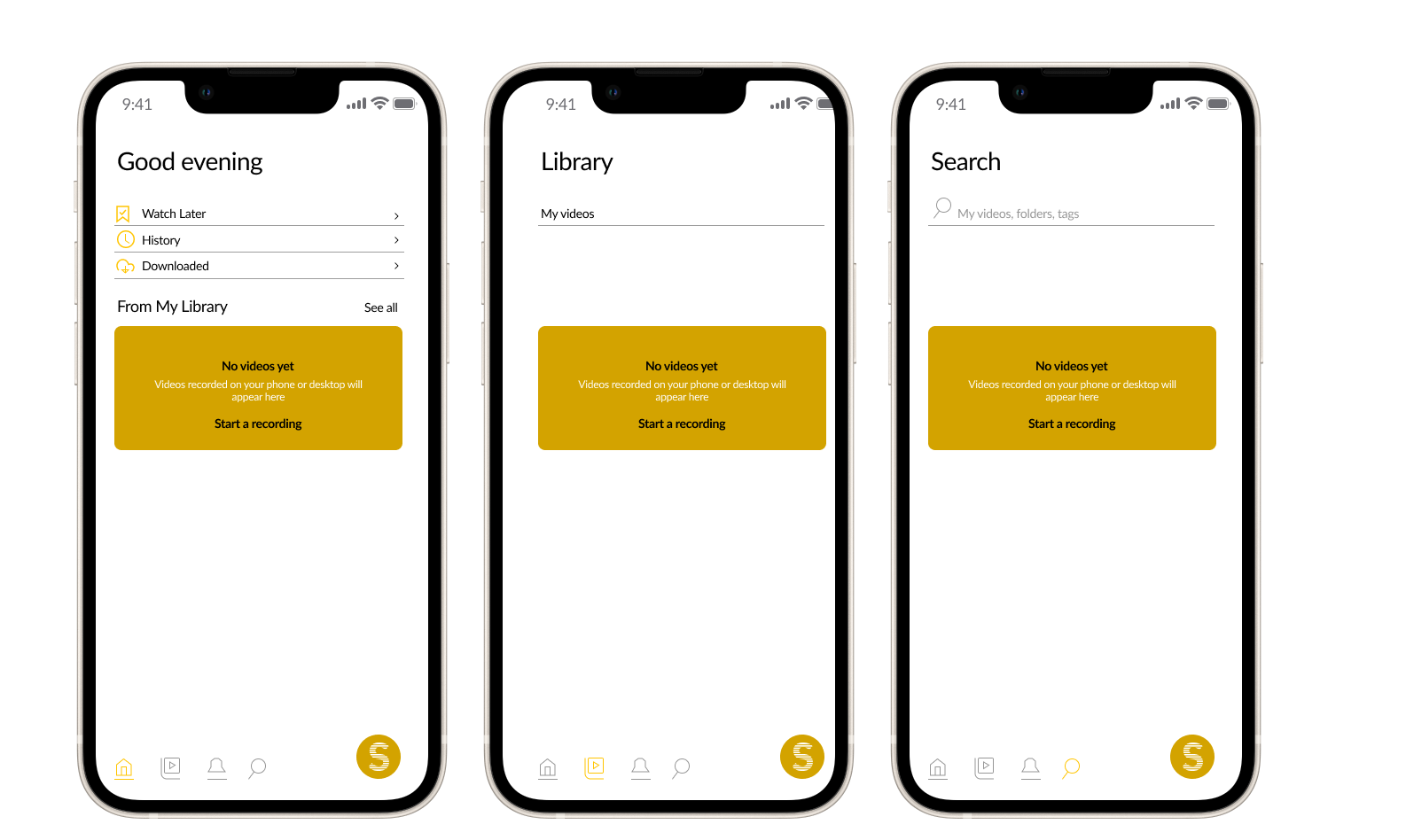
Wireframes
Low fidelity


Work in Progress
Designs


How does it work?
Homepage

Easy access
to valuable information
Video tutorials have been thoughtfully uploaded by caregivers
Tutorials by categories
The interface displays various categories for seniors to easily view videos by topic, ensuring quick access to relevant content.
Key Takeaways
Understanding technology for seniors
Many find technology intimidating, so the challenge with Saathi was to simplify interfaces and address barriers like fear, physical limitations, and lack of exposure. Empathy and patience were as crucial as technical skills.
The power of community
One surprising insight was how community helps overcome tech barriers. Many seniors felt more confident learning with peers or family, showing that social learning effectively bridges the digital divide.